This guide will help you navigate the SOC 2 Type 2 audit process and ensure you're fully prepared for success.
Understanding Type 2: What's Different?
Type 1 vs Type 2: The Key Difference
Type 1: Evaluates whether controls are suitably designed at a specific point in time.
Type 2: Evaluates whether controls operated effectively throughout a defined period (typically 3-12 months).
Already Completed Type 1?
If you have already completed a Type 1 audit, much of the heavy lifting has been done through configuring the necessary systems, publishing policies, and personnel onboarding. The focus for Type 2 is maintaining and demonstrating ongoing operational effectiveness.
New to SOC 2? If you have not completed a Type 1 previously, please refer back to the guidance in the Vanta SOC 2 Type 1 Quick Start Guide to ensure your foundational setup is complete before beginning your Type 2 journey.
Step 1: Set Up Your Audit Period in Vanta
Your audit period is the timeframe your auditor will examine.
Recommended Timeline
Audit Period Length: We recommend starting with a 3-month observation period for your first Type 2 audit. If you have completed a Type 2 audit already, we typically advise that clients move into a 12 month observation period.
Scheduling Best Practices: Begin your audit period on the first day of the month and end on the last day of the month. If transitioning from Type 1, start your Type 2 period as close to or before your Type 1 report date as possible.
Backdating Option: You have the option to backdate the observation period, as long as the necessary Vanta connections were integrated during that time. Consult with your auditor if you're unsure whether backdating is appropriate.
Create Your Audit in Vanta
-
Go to the Compliance tab → select Audits
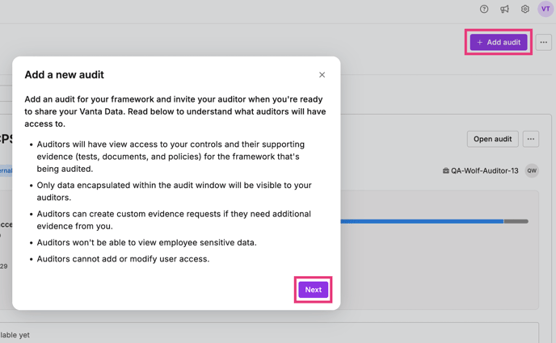
-
From here, enter your audit details:
-
- Framework: SOC 2 Type 2
- Audit period dates (based on your chosen dates from 3 to 12 months)
- Add your auditors:
- csplatform@sensiba.com - this ensures we can start supporting you right away
- auditops@sensiba.com - our AI audit assistant
- Your assigned Lead Auditor (ask your CSM for auditor details if unsure)
If you have other frameworks in scope, for example HIPAA or GDPR, follow the instructions above to make the audit packages for those frameworks as well.
⚠️ Notify your customer success manager or auditor once these steps are complete to initiate your Type 2 audit.
💡 Watch this video walkthrough for a step-by-step guidance to granting access and create the audit package in vanta.
Step 2: Scope your controls
Vanta comes with a broad set of default controls, but you don’t need all of them for your audit.
- Your audit with us only requires a subset of controls.
- There are approximately 50 controls relevant for Security, Availability, and Confidentiality Trust Service Criteria. We've included Processing Integrity & Privacy, however these are not tested by default.
- You can safely descope/exclude any evidence that isn't relevant to your audit, as per our control listing provided below.
- Please note: Vanta focuses on evidence items rather than controls, and automatically links some evidence to specific controls. However, in some cases, we may request different or additional evidence that better supports the control, as there are different evidence items that arise depending on which systems you have integrated into Vanta to ensure sufficient coverage. This is normal and ensures the most accurate and efficient audit process.
Step 3: Maintain Evidence Throughout Your Audit Period
Type 2 requires continuous evidence collection across your entire observation period, with sample evidence needed for population-based and period controls. Key areas of focus include:
Population-Based Controls
Maintain documentation for all instances that occur during your audit period:
- New hires: Background checks, policy acknowledgments in Vanta, onboarding checklists documenting system access approval
- Terminations: Offboarding checklists, system access revocation documentation, device return confirmation
- Code changes: Change tickets with documented testing, approval, and resolution for all production releases
- Incidents: Tickets with clear response, resolution, and RCA documentation in your ticketing system
- Personnel Compliance: Ensure that all in scope employees are compliant with policies, hard disk encryption and anti virus
Periodic Controls
- Business Continuity / DR test: Annual testing of disaster recovery and business continuity plans. Specifically, showing the restoration of IT systems and critical data after a hypothetical disaster.
- Incident Response test: Annual testing of incident response procedures through the simulation of the response to an example scenario (eg Phishing attack) and the documentation of the lessons learned.
- Risk assessment: Annual organizational risk assessment.
- Penetration test: Annual penetration testing (if applicable).
- Security awareness training: Annual completion of security training by all employees.
- Access reviews: Documented reviews per the frequency defined in your access policies.
- Vendor reviews: Annual review of SOC 2 reports for critical subservice organizations.
What to Expect During Your Type 2 Audit
AI Assessment
Your auditor will run the AI review of your Vanta instance and share the Type 2 workpaper with all outstanding controls.
Evidence Requests
Your auditor will request evidence for population-based controls approximately 2 weeks before your audit period ends to ensure accurate sampling.
Sampling Methodology
Sample sizes are determined by population size.
Non-Occurrences
If no instances of a population-based control occurred during your audit period (e.g., no new hires, terminations, or security incidents), the control will be marked as a "non-occurrence" in your report. This is a standard audit notation and does not reflect negatively on your compliance.
Tips for Success
- Leverage Vanta's monitoring and compliance dashboard weekly to identify issues early
- Schedule annual controls early in your audit period
- Contact your auditor if you have questions about specific control requirements
Need Support?
Our team is here to guide you through every step of your compliance journey, we cannot wait to work with you!
Need Help? Contact us at csplatform@sensiba.com.
Schedule a Kick-Off Call: Book a time with one of our Customer Success Team using here.