This guide will help you fast-track your audit readiness and ensure you're fully prepared for success.
1. Configuring your Systems & Scope
Your audit scope defines what systems, users, and resources will be included in the audit. Getting this right at the start avoids wasted effort and delays later.
Systems to connect in Vanta (if applicable):
- Cloud Providers
- Databases
- Version Control (GitHub, GitLab, Bitbucket, etc.)
- Identity Providers (IDP)
- Mobile Device Management (MDM)
✅ In-scope: Production systems, databases containing sensitive data, and any infrastructure processing customer information
❌ Out-of-scope: Development, testing, and sandbox environments
💡 Tip: Always confirm that your in-scope inventory covers all production systems and sensitive data — and nothing unnecessary.
📖 For further step-by-step instructions, view more about configuring your scope in Vanta here.
2. Scope your Controls
Vanta comes with a broad set of default controls, but you don’t need all of them for your audit.
- Your audit with us only requires a subset of controls.
- There are approximately 50 controls relevant for Security, Availability, and Confidentiality Trust Service Criteria. We've included Processing Integrity & Privacy, however these are not tested by default.
- You can safely descope/exclude any evidence that isn't relevant to your audit, as per our control listing provided below.
- Please note: Vanta focuses on evidence items rather than controls, and automatically links some evidence to specific controls. However, in some cases, we may request different or additional evidence that better supports the control, as there are different evidence items that arise depending on which systems you have integrated into Vanta to ensure sufficient coverage. This is normal and ensures the most accurate and efficient audit process.
📖 Download Sensiba's SOC 2 Control Framework here.
3. Grant Auditor Access
Granting access early enables us to provide targeted guidance, streamline your preparation, and accelerate your audit readiness.
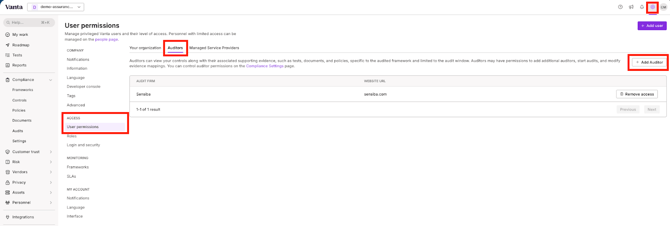
1. Navigating to Settings → User Permissions → Auditors → Add Auditor - add Sensiba as your audit firm. Notify your customer success manager once completed!
2. Create your Audit Package
a) Go to the Compliance tab → select Audits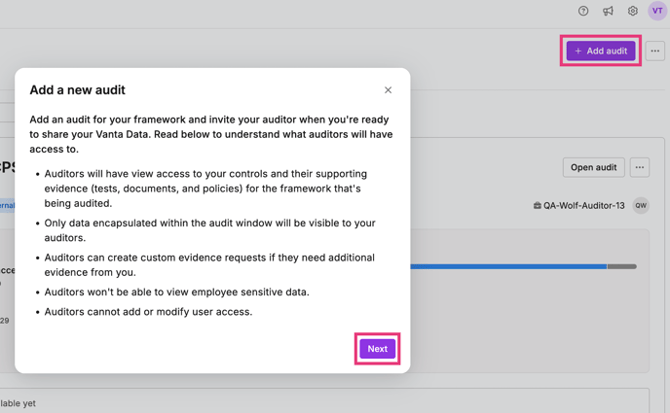
b) From here, select:
- Framework: SOC 2 Type 1
- Audit firm: Sensiba
- Auditors: csplatform@sensiba.com & auditops@sensiba.com
- Audit as of date or Audit period:
For Type 1 - select today’s date
📖 If you would prefer to watch a step-by-step video, follow this link to a loom video.
4. Complete your System Description
This is a key step for your audit:
- It forms the basis of your final report
- It tells your auditor exactly which systems are in scope
You can complete it by following the instructions linked here.
💡 Note: While Vanta also has a system description, ours is different and required for the audit. The good news is you can re-use much of the information you’ve already entered into Vanta.
5. Key Focus Areas to Get Your Vanta Instance Audit-Ready
To ensure a smooth and efficient audit, we recommend reviewing and configuring the following focus areas in your Vanta instance:
- Personnel in Scope:
Ensure all employees in scope are listed in Vanta.
Manually mark personnel out of scope that do not maintain access to your critical systems and/or sensitive data (contractors if applicable). Vanta resource on best practices. - Policy Management:
Create your policies with Vantas policy builder.
Alternatively, use our complimentary policy generator and upload the custom policies to Vanta.
Review and approve policies and track employee policy acknowledgement.
Vantas Article - Getting Started with Policies - Risk Management:
Document your risks, define mitigation plans, and assign ownership.
Use Vanta's risk register, or upload a manual register. - Vendor Management:
Add your critical vendors, assign risk ratings, and complete annual reviews for those rated high or critical. - Monitoring Tests:
Configure key monitoring checks so controls are continuously validated within Vanta. - Device Compliance:
Integrate your MDM or use the Vanta Agent to monitor personnel devices in scope.
💡 Tip: Think of these areas as the “readiness foundation” — the stronger they are, the smoother your audit will go.
📖 Another helpful resource - Vanta’s SOC 2 Readiness Checklist.
Need Help?
We’re here for you! If you have questions or something feels unclear, reach out anytime at csplatform@sensiba.com
To discuss the above, book a meeting with a Customer Success to kick off your audit:
Book a meeting here.